" width="31.844343999969944px"><path d="M 0 31.84 L 0 0 L 31.84 0 L 31.84 31.84 Z" fill="transparent" height="31.8403px" id="bDMh1GdUQ" transform="translate(0.002 0)" width="31.8403px"/><path d="M 0 0 L 0 31.84 L 14.379 31.84 L 14.379 19.139 L 8.175 25.342 L 5.995 23.162 L 15.922 13.235 L 25.849 23.162 L 23.669 25.342 L 17.466 19.139 L 17.466 31.84 L 31.844 31.84 L 31.844 0 Z M 23.667 16.772 L 15.92 9.025 L 8.173 16.772 L 5.993 14.592 L 15.92 4.664 L 25.847 14.592 Z" fill="rgb(63, 91, 30)" height="31.84030625px" id="LkBC_qYlr" transform="translate(0 0.002)" width="31.844344px"/></g><path d="M 4.708 16.728 L 4.708 2.772 L 0 2.772 L 0 0 L 12.666 0 L 12.666 2.772 L 7.958 2.772 L 7.958 16.728 Z" fill="rgb(38, 45, 30)" height="16.72833px" id="gGM6jCh9B" transform="translate(117.426 7.593)" width="12.666000000000011px"/><path d="M 6.978 17.111 C 5.815 17.111 4.756 16.912 3.8 16.513 C 2.844 16.099 2.031 15.502 1.362 14.721 C 0.709 13.94 0.255 13 0 11.901 L 2.939 11.041 C 3.178 12.076 3.664 12.889 4.397 13.478 C 5.13 14.052 5.99 14.339 6.978 14.339 C 7.743 14.339 8.396 14.163 8.938 13.813 C 9.479 13.462 9.75 12.913 9.75 12.164 C 9.75 11.686 9.583 11.304 9.248 11.017 C 8.93 10.714 8.508 10.467 7.982 10.276 C 7.456 10.085 6.875 9.902 6.237 9.726 C 5.6 9.551 4.963 9.352 4.325 9.129 C 3.688 8.906 3.107 8.619 2.581 8.269 C 2.055 7.902 1.625 7.44 1.29 6.883 C 0.972 6.309 0.813 5.592 0.813 4.732 C 0.813 3.776 1.075 2.947 1.601 2.246 C 2.127 1.529 2.828 0.98 3.704 0.597 C 4.58 0.199 5.544 0 6.596 0 C 7.631 0 8.579 0.175 9.44 0.526 C 10.316 0.876 11.049 1.37 11.638 2.007 C 12.244 2.629 12.658 3.37 12.881 4.23 L 10.013 5.353 C 9.774 4.509 9.352 3.871 8.747 3.441 C 8.141 2.995 7.416 2.772 6.572 2.772 C 5.807 2.772 5.194 2.939 4.732 3.274 C 4.286 3.593 4.063 4.031 4.063 4.588 C 4.063 5.019 4.222 5.369 4.541 5.64 C 4.875 5.895 5.305 6.11 5.831 6.285 C 6.357 6.444 6.938 6.604 7.576 6.763 C 8.213 6.906 8.85 7.098 9.487 7.337 C 10.125 7.56 10.706 7.854 11.232 8.221 C 11.758 8.587 12.18 9.073 12.498 9.679 C 12.833 10.284 13 11.041 13 11.949 C 13 13.048 12.729 13.988 12.188 14.769 C 11.662 15.533 10.945 16.115 10.037 16.513 C 9.129 16.912 8.109 17.111 6.978 17.111 Z" fill="rgb(38, 45, 30)" height="17.11076px" id="W33rhMq3Y" transform="translate(102.662 7.402)" width="13px"/><path d="M 0 16.728 L 0 0 L 11.328 0 L 11.328 2.772 L 3.274 2.772 L 3.274 6.644 L 9.798 6.644 L 9.798 9.416 L 3.274 9.416 L 3.274 13.956 L 11.423 13.956 L 11.423 16.728 Z" fill="rgb(38, 45, 30)" height="16.72833px" id="LASbkhR29" transform="translate(89.162 7.593)" width="11.422699999999992px"/><path d="M 0 16.728 L 0 0 L 6.357 0 C 7.408 0 8.324 0.207 9.105 0.621 C 9.902 1.02 10.523 1.593 10.969 2.342 C 11.415 3.075 11.638 3.935 11.638 4.923 C 11.638 5.879 11.383 6.755 10.873 7.552 C 10.379 8.332 9.694 8.93 8.818 9.344 L 12.833 16.728 L 9.153 16.728 L 5.664 9.87 L 3.25 9.87 L 3.25 16.728 Z M 3.25 7.098 L 5.783 7.098 C 6.58 7.098 7.209 6.898 7.671 6.5 C 8.149 6.086 8.388 5.56 8.388 4.923 C 8.388 4.27 8.149 3.752 7.671 3.37 C 7.209 2.971 6.58 2.772 5.783 2.772 L 3.25 2.772 Z" fill="rgb(38, 45, 30)" height="16.72833px" id="DsldZOwJ8" transform="translate(73.861 7.593)" width="12.832999999999998px"/><path d="M 7.289 17.111 C 5.839 17.111 4.565 16.76 3.465 16.059 C 2.382 15.342 1.529 14.347 0.908 13.072 C 0.303 11.782 0 10.276 0 8.555 C 0 6.835 0.303 5.337 0.908 4.063 C 1.529 2.772 2.382 1.776 3.465 1.075 C 4.565 0.358 5.839 0 7.289 0 C 8.739 0 10.005 0.358 11.088 1.075 C 12.188 1.776 13.04 2.772 13.646 4.063 C 14.267 5.337 14.578 6.835 14.578 8.555 C 14.578 10.276 14.267 11.782 13.646 13.072 C 13.04 14.347 12.188 15.342 11.088 16.059 C 10.005 16.76 8.739 17.111 7.289 17.111 Z M 7.289 14.339 C 8.101 14.339 8.802 14.1 9.392 13.622 C 9.997 13.128 10.467 12.451 10.802 11.59 C 11.136 10.714 11.304 9.702 11.304 8.555 C 11.304 7.392 11.136 6.381 10.802 5.52 C 10.467 4.66 9.997 3.991 9.392 3.513 C 8.802 3.019 8.101 2.772 7.289 2.772 C 6.492 2.772 5.783 3.019 5.162 3.513 C 4.556 3.991 4.086 4.66 3.752 5.52 C 3.417 6.381 3.25 7.392 3.25 8.555 C 3.25 9.702 3.417 10.714 3.752 11.59 C 4.086 12.451 4.556 13.128 5.162 13.622 C 5.783 14.1 6.492 14.339 7.289 14.339 Z" fill="rgb(38, 45, 30)" height="17.11076px" id="ipX7BNsrY" transform="translate(56.609 7.402)" width="14.577600000000004px"/><path d="M 0 16.728 L 0 0 L 11.351 0 L 11.351 2.772 L 3.25 2.772 L 3.25 6.644 L 9.798 6.644 L 9.798 9.416 L 3.25 9.416 L 3.25 16.728 Z" fill="rgb(38, 45, 30)" height="16.72833px" id="T3zzexfqV" transform="translate(43.557 7.593)" width="11.351399999999998px"/></svg>)

Integration
Fintech
Zendesk
New Forest app for Zendesk: Replace a lost card right from the ticket
Guillaume Rigal
" transform="translate(1.749 1.749)" width="10.501px"/></g></svg>)
0 min read
The Forest app for Zendesk lets your support agents run governed back-office actions on your data, from inside the Zendesk ticket. Forest actions, RBAC, audit trail.
A support agent at a regulated fintech picks up a ticket. The customer has lost their card. In one motion, the support agent orders a replacement, logs the action in the audit trail, and closes the ticket. Without leaving Zendesk.
Regulated fintechs live between two tools. Zendesk holds the ticket. Forest holds the customer record, the KYC status, the card ledger, the audit trail, the action.
Showing that record inside the ticket is the easy part. A sidebar that reads an email and paints a customer profile is table stakes. The Zendesk Marketplace is full of apps that do it.
The hard part starts the moment the support agent has to do something. Replace the card. Refund the transaction. Reopen the account. That stops being a display problem and becomes a control problem.
Who is allowed to run this action? What did it actually change in your systems? Can you prove it weeks later, tied to a named person? For a regulated fintech, those three questions are the job. Get them wrong and a helpful support agent turns into an audit finding.
For every fintech living between Forest and Zendesk, that gap between what an agent can see and what an agent can safely do has come up in nearly every conversation we've had for months. Today those three questions have an answer inside the ticket. We're launching the Forest app for Zendesk.
Now live on the Zendesk Marketplace, the Forest app lets your support agents run governed back-office actions from inside every ticket. Under your Forest permissions. Logged in your Forest audit trail. On your own infrastructure. The customer record, KYC status, and cards on file come with it, but the record was never the point. The action under control is.
How the Forest Zendesk app governs every action
The sidebar loads inside every ticket, matches the sender to your Forest record, and renders what the agent is allowed to see. Balances, cards on file, KYC status, all from your schema. That part is not hard. What runs underneath it is.
Not every agent can run every action
The sidebar only offers what the agent's Forest role permits. A first-line agent can replace a lost card. Refunding above a threshold, or reopening a closed account, may sit with someone else. Same ticket, same customer, a different agent sees a different set of actions. RBAC decides what is clickable before anyone clicks, so the control lives in the design of the role, not in the discipline of the person.
Every action is a governed operation, not a macro
A Forest action is not a text template or a canned reply. It is a real operation on your back-office, with dynamic forms, validation rules, and provider calls into your custom code. Refund a transaction. Update an account. Send a card replacement. Each one runs bounded and validated, against your systems, not next to them.
Every action is provable, tied to a person
Every action a support agent runs writes one entry in your Forest audit trail, linked to the ticket ID and the agent's Forest identity. Who ran it, what it changed, when. Weeks later, when a regulator or a risk review asks what happened on an account, the answer is one lookup, not a reconstruction.
All of it calls your Forest MCP Server on your own infrastructure. Nothing is stored outside your systems. Nothing is copied. Nothing leaves.
One ticket, start to finish with the Forest Zendesk app
A customer opens a Zendesk ticket. They say they have lost their card. Here is what happens next.
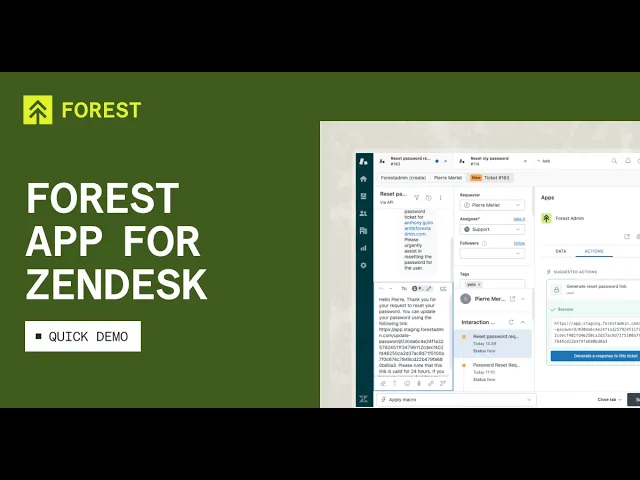
The Forest sidebar loads inside the ticket. It reads the requester's email, matches it against your Forest records, and surfaces the customer. Bounded by the support agent's Forest role. The support agent sees the plan, the balances, and the cards on file. Nothing more.
The sidebar analyses the ticket contents and surfaces a recommended action, "Replace the card", based on what the customer wrote.
The support agent clicks Execute. The action runs as a Forest action. It calls your custom code. It writes the change to your Forest record. It fires the audit event.
A confirmation surfaces. The new card will ship in a few business days.
The support agent replies to the customer in Zendesk and closes the ticket.
No copy-paste. No context switch. No untracked action. One audit trail entry for the whole thing, linked to the ticket ID and the support agent's Forest identity.
Where the Forest Zendesk app goes next
The app is live today with Forest actions triggered manually from the ticket. Here's where the roadmap goes.
Full Forest Workflows inside the ticket
Multi-step orchestrations, dynamic branching, and human-in-the-loop approvals, running from the ticket. Your compliance-heavy processes join the same interface your support team already uses.
Auto-triggers on ticket events
Actions that fire on new tickets, on status changes, on tag updates, under the same permissions and audit trail as manual actions. Your escalation paths automate without a separate rules engine to maintain.
AI agents on the same governance
Your AI agents already plug into Forest through the MCP Server, under the same RBAC and the same audit trail as the humans in Zendesk. As the Forest Zendesk app grows, the boundary between them stays where it should be: your governance.
Try the Forest Zendesk app on your data
Three ways to jump in.
Install it from the Zendesk Marketplace
Two clicks and your Forest data lands in the ticket sidebar: Zendesk Marketplace.
And our documentation for the Zendesk Forest app is only a click away.
Get a live walkthrough on your setup
We'll run it against a back-office close to yours and show you what the audit trail looks like on your own data.
Tell us your wishlist
This is version one. If there's a Forest action, a workflow, or an automation you'd want it to run for your team, we want to hear it. Get in touch here. Your wishlist shapes what ships next.
With Forest, your support team and your AI agents work the same regulated back-office, under the same rules, with the same audit trail. Come find us at forest.app.