" width="31.844343999969944px"><path d="M 0 31.84 L 0 0 L 31.84 0 L 31.84 31.84 Z" fill="transparent" height="31.8403px" id="bDMh1GdUQ" transform="translate(0.002 0)" width="31.8403px"/><path d="M 0 0 L 0 31.84 L 14.379 31.84 L 14.379 19.139 L 8.175 25.342 L 5.995 23.162 L 15.922 13.235 L 25.849 23.162 L 23.669 25.342 L 17.466 19.139 L 17.466 31.84 L 31.844 31.84 L 31.844 0 Z M 23.667 16.772 L 15.92 9.025 L 8.173 16.772 L 5.993 14.592 L 15.92 4.664 L 25.847 14.592 Z" fill="rgb(63, 91, 30)" height="31.84030625px" id="LkBC_qYlr" transform="translate(0 0.002)" width="31.844344px"/></g><path d="M 4.708 16.728 L 4.708 2.772 L 0 2.772 L 0 0 L 12.666 0 L 12.666 2.772 L 7.958 2.772 L 7.958 16.728 Z" fill="rgb(38, 45, 30)" height="16.72833px" id="gGM6jCh9B" transform="translate(117.426 7.593)" width="12.666000000000011px"/><path d="M 6.978 17.111 C 5.815 17.111 4.756 16.912 3.8 16.513 C 2.844 16.099 2.031 15.502 1.362 14.721 C 0.709 13.94 0.255 13 0 11.901 L 2.939 11.041 C 3.178 12.076 3.664 12.889 4.397 13.478 C 5.13 14.052 5.99 14.339 6.978 14.339 C 7.743 14.339 8.396 14.163 8.938 13.813 C 9.479 13.462 9.75 12.913 9.75 12.164 C 9.75 11.686 9.583 11.304 9.248 11.017 C 8.93 10.714 8.508 10.467 7.982 10.276 C 7.456 10.085 6.875 9.902 6.237 9.726 C 5.6 9.551 4.963 9.352 4.325 9.129 C 3.688 8.906 3.107 8.619 2.581 8.269 C 2.055 7.902 1.625 7.44 1.29 6.883 C 0.972 6.309 0.813 5.592 0.813 4.732 C 0.813 3.776 1.075 2.947 1.601 2.246 C 2.127 1.529 2.828 0.98 3.704 0.597 C 4.58 0.199 5.544 0 6.596 0 C 7.631 0 8.579 0.175 9.44 0.526 C 10.316 0.876 11.049 1.37 11.638 2.007 C 12.244 2.629 12.658 3.37 12.881 4.23 L 10.013 5.353 C 9.774 4.509 9.352 3.871 8.747 3.441 C 8.141 2.995 7.416 2.772 6.572 2.772 C 5.807 2.772 5.194 2.939 4.732 3.274 C 4.286 3.593 4.063 4.031 4.063 4.588 C 4.063 5.019 4.222 5.369 4.541 5.64 C 4.875 5.895 5.305 6.11 5.831 6.285 C 6.357 6.444 6.938 6.604 7.576 6.763 C 8.213 6.906 8.85 7.098 9.487 7.337 C 10.125 7.56 10.706 7.854 11.232 8.221 C 11.758 8.587 12.18 9.073 12.498 9.679 C 12.833 10.284 13 11.041 13 11.949 C 13 13.048 12.729 13.988 12.188 14.769 C 11.662 15.533 10.945 16.115 10.037 16.513 C 9.129 16.912 8.109 17.111 6.978 17.111 Z" fill="rgb(38, 45, 30)" height="17.11076px" id="W33rhMq3Y" transform="translate(102.662 7.402)" width="13px"/><path d="M 0 16.728 L 0 0 L 11.328 0 L 11.328 2.772 L 3.274 2.772 L 3.274 6.644 L 9.798 6.644 L 9.798 9.416 L 3.274 9.416 L 3.274 13.956 L 11.423 13.956 L 11.423 16.728 Z" fill="rgb(38, 45, 30)" height="16.72833px" id="LASbkhR29" transform="translate(89.162 7.593)" width="11.422699999999992px"/><path d="M 0 16.728 L 0 0 L 6.357 0 C 7.408 0 8.324 0.207 9.105 0.621 C 9.902 1.02 10.523 1.593 10.969 2.342 C 11.415 3.075 11.638 3.935 11.638 4.923 C 11.638 5.879 11.383 6.755 10.873 7.552 C 10.379 8.332 9.694 8.93 8.818 9.344 L 12.833 16.728 L 9.153 16.728 L 5.664 9.87 L 3.25 9.87 L 3.25 16.728 Z M 3.25 7.098 L 5.783 7.098 C 6.58 7.098 7.209 6.898 7.671 6.5 C 8.149 6.086 8.388 5.56 8.388 4.923 C 8.388 4.27 8.149 3.752 7.671 3.37 C 7.209 2.971 6.58 2.772 5.783 2.772 L 3.25 2.772 Z" fill="rgb(38, 45, 30)" height="16.72833px" id="DsldZOwJ8" transform="translate(73.861 7.593)" width="12.832999999999998px"/><path d="M 7.289 17.111 C 5.839 17.111 4.565 16.76 3.465 16.059 C 2.382 15.342 1.529 14.347 0.908 13.072 C 0.303 11.782 0 10.276 0 8.555 C 0 6.835 0.303 5.337 0.908 4.063 C 1.529 2.772 2.382 1.776 3.465 1.075 C 4.565 0.358 5.839 0 7.289 0 C 8.739 0 10.005 0.358 11.088 1.075 C 12.188 1.776 13.04 2.772 13.646 4.063 C 14.267 5.337 14.578 6.835 14.578 8.555 C 14.578 10.276 14.267 11.782 13.646 13.072 C 13.04 14.347 12.188 15.342 11.088 16.059 C 10.005 16.76 8.739 17.111 7.289 17.111 Z M 7.289 14.339 C 8.101 14.339 8.802 14.1 9.392 13.622 C 9.997 13.128 10.467 12.451 10.802 11.59 C 11.136 10.714 11.304 9.702 11.304 8.555 C 11.304 7.392 11.136 6.381 10.802 5.52 C 10.467 4.66 9.997 3.991 9.392 3.513 C 8.802 3.019 8.101 2.772 7.289 2.772 C 6.492 2.772 5.783 3.019 5.162 3.513 C 4.556 3.991 4.086 4.66 3.752 5.52 C 3.417 6.381 3.25 7.392 3.25 8.555 C 3.25 9.702 3.417 10.714 3.752 11.59 C 4.086 12.451 4.556 13.128 5.162 13.622 C 5.783 14.1 6.492 14.339 7.289 14.339 Z" fill="rgb(38, 45, 30)" height="17.11076px" id="ipX7BNsrY" transform="translate(56.609 7.402)" width="14.577600000000004px"/><path d="M 0 16.728 L 0 0 L 11.351 0 L 11.351 2.772 L 3.25 2.772 L 3.25 6.644 L 9.798 6.644 L 9.798 9.416 L 3.25 9.416 L 3.25 16.728 Z" fill="rgb(38, 45, 30)" height="16.72833px" id="T3zzexfqV" transform="translate(43.557 7.593)" width="11.351399999999998px"/></svg>)
Zendesk App
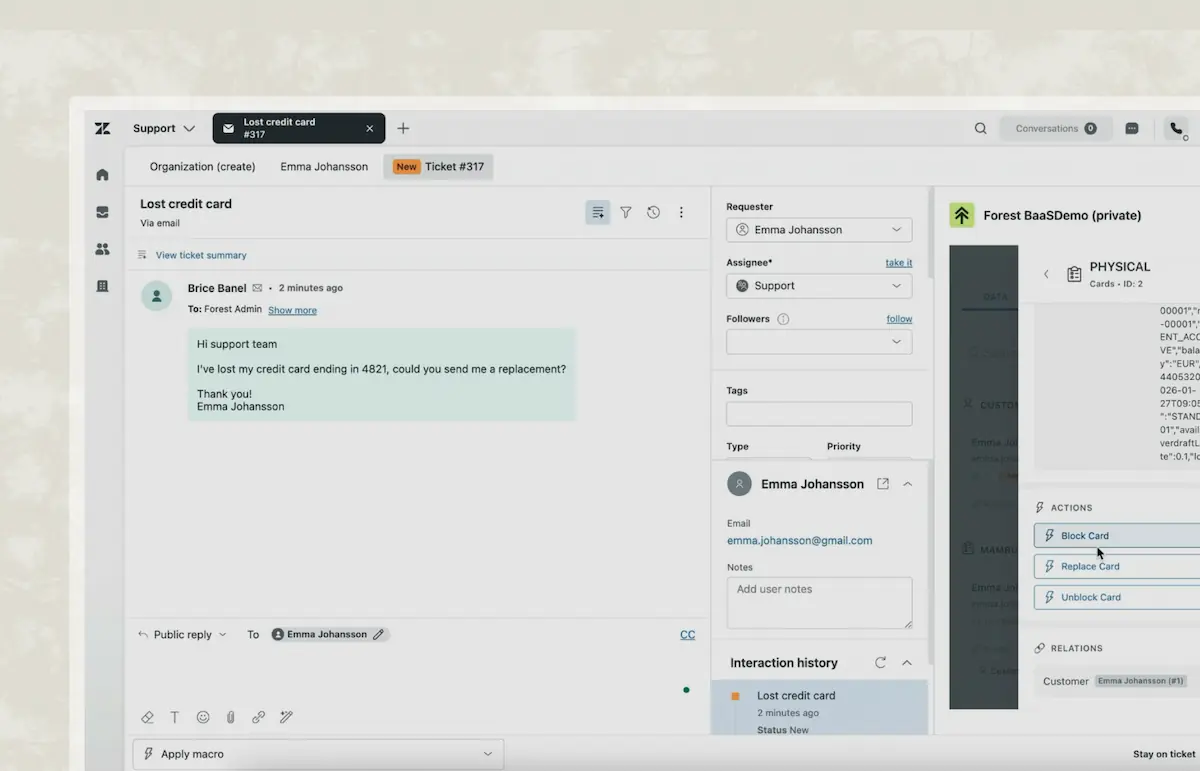
Support sees the live customer and acts on it without ever leaving the ticket. The Forest app for Zendesk pulls data straight from your own database, governed by your own rules. Nothing is copied into Zendesk. Nothing is left for someone else to action later.
TL;DR
The Forest app for Zendesk puts your live back-office record, and the Forest Actions your team runs on it, inside the Zendesk ticket.
Your support agents see the real customer and run the Forest Actions your admins set up, like reset, refund, re-screen, or escalate, without leaving the ticket.
It reads live from your own database under your own permissions, nothing is copied into Zendesk, and every action lands in your audit trail.
Agents see the live customer in the sidebar and act on it from the same screen. No stale data, no second tool to open. Every action runs under your existing permissions and lands in your audit trail.
The right customer, found for you
Forest matches the ticket sender to the customer, user, or partner in your data and surfaces it in the sidebar. Nothing is duplicated into Zendesk. The agent is looking at the same record the rest of the business relies on, exactly as it stands right now.
Resolve it here, not three tabs away
The Smart Actions your ops team runs in Forest (reset, refund, re-screen, escalate) run from inside the ticket. No second tab, no request filed with engineering, no retyping the same details into yet another system.
The permissions you already trust
Actions inherit the agent's Forest role, down to the table, with maker-checker wherever you've set it. There's no parallel access model to keep in sync: whatever an agent can do in Forest is exactly what they can do from the ticket, no more.
A trail that holds up under audit
A refund raised from a ticket is written to your system of record, not just noted in Zendesk, where logs can be edited or deleted. Every action lands at the record level, which is precisely what an LCB-FT or ACPR review will ask you to produce.
Only the agents who should
Lock the app to specific Zendesk roles and groups at install. Agents with no business touching the back-office simply never see the actions. Everyone can read the record; only the right people can move it.
Your data stays on your side
The app talks to your Forest MCP Server, which the Forest Agent runs inside your own environment. Customer data reaches a provider only at the moment its service is called, and never sits on a Forest server in between.


Where it belongs
" height="75px" id="zVbSHlMoa" width="75px"/><path d="M 0 0 L 15 0 L 15 45 L 0 45 Z" fill="rgb(63, 91, 30)" height="45px" id="CH_iVM7qH" width="15px"/><path d="M 60 0 L 60 30 L 0 30 L 0 0 Z" fill="rgb(63, 91, 30)" height="30px" id="ttSD1A5rV" transform="translate(15 45)" width="60px"/></svg>)
A decision already made
The agent knows the next move: collect a document, kick off a re-screen, issue a refund, flip a status. One governed action, taken in seconds, recorded as it happens.
A decision still to make
An AML alert, a contested dispute, an escalation with several moving parts. Anything where the agent has to piece the story together before acting. The ticket is too narrow a window for that work.
One trail to reconstruct
Wherever the action is taken, it writes to the same record-level log. When a regulator asks what happened, there's a single account to follow, not two partial ones stitched across systems.
Frequently asked questions
You still have question ?
Book a conversation with a forest expert
What does the Forest app actually do inside Zendesk?
It pulls the matching customer from your Forest data into the ticket sidebar and lets the agent run Forest Smart Actions on it, right there. The record never leaves your system; the agent simply works it without opening another tool. See the Zendesk app guide.
Does my customer data get copied into Zendesk?
No. The app reads your data live through the Forest MCP Server, which runs inside your own environment. What the agent sees is rendered in the ticket on the fly. Nothing is stored on Zendesk's side.
How are permissions handled?
Each action inherits the agent's Forest role, with permissions down to the table and maker-checker wherever you've set it. It's the model you already run, so there's nothing separate to maintain. You can also limit the app to specific Zendesk roles and groups at install, so the actions only appear for the agents who should have them.
Zendesk already logs activity. Why does the Forest trail matter?
Because a Zendesk log can be edited or deleted, which is exactly what makes it unconvincing to a regulator. An action taken through Forest is written to your system of record at the record level, and that's the form of evidence an LCB-FT or ACPR review expects to see.
How does the app relate to the Forest MCP Server?
The MCP Server is what the app runs on. The Zendesk app is one client among others; it calls the MCP Server to read data and trigger actions, just as Claude or n8n would. That's why the server has to be enabled first, and why its address is the forestAgentUrl you enter at install. See the MCP Server guide.
What needs to be in place before I install?
The Forest MCP Server has to be enabled on your project, and you'll need its URL (the forestAgentUrl) to finish the install. If you're not sure whether it's running, your tech team can set it up in a few steps. See the MCP Server guide.
How do I install and configure it?
Install the Forest app from the Zendesk Marketplace, give it your forestAgentUrl and the ticket field used to match a sender to a record, and optionally restrict it by Zendesk role and group. Then open the app, connect to Forest, and pick your organisation, project, environment, and team. The full walkthrough is in the Zendesk app guide.
When should something go to Forest Workspace rather than the ticket?
The moment the agent has to figure out what happened before they can act. Collecting a document or running a known action belongs in the ticket; an AML investigation or a tangled dispute belongs in Forest Workspace, where the whole picture is in front of them.
How is this different from a Zendesk-native app like Sweethawk?
A Zendesk-native app works on Zendesk's own objects. The Forest app works on your system of record (the database your business actually runs on), with governed actions and a record-level trail behind each one. It reaches into your back-office, not just around Zendesk's data model.
Is the app priced separately?
No. The Forest app is included with your Forest plan.